# Account locked when boot into windows
**URL:** https://gpdsupport.com/t/account-locked-when-boot-into-windows/178
**Category:** Resolved Support Request
**Tags:** windows, software, p2max
**Created:** [September 1, 2019, 5:57am UTC](https://gpdsupport.com/t/account-locked-when-boot-into-windows/178 "2019-09-01T05:57:41Z")
**Posts on this page:** 9
**Page:** 1
### Author:  [@Ion23](https://gpdsupport.com/u/Ion23)
#### Post date: [September 1, 2019, 5:57am UTC](https://gpdsupport.com/t/account-locked-when-boot-into-windows/178/1 "2019-09-01T05:57:41Z")
When i received my device, it is account locked and it seems like my windows is not activated.
---
### Author:  [@petem](https://gpdsupport.com/u/petem)
#### Post date: [September 1, 2019, 10:39am UTC](https://gpdsupport.com/t/account-locked-when-boot-into-windows/178/2 "2019-09-01T10:39:00Z")
Did you try reboot out of the engineering mode?
I heard this resolved this issue previously?
Please reply if this is not the case. Also if not the case please provide more detail and provide screenshot or picture if possible. Thanks
---
### Author:  [@Ion23](https://gpdsupport.com/u/Ion23)
#### Post date: [September 1, 2019, 11:05am UTC](https://gpdsupport.com/t/account-locked-when-boot-into-windows/178/3 "2019-09-01T11:05:43Z")
I don’t know how to do that? GPD said to press fn alt shift f3. But I don’t know when to do this. Their English is awful.
---
### Author:  [@petem](https://gpdsupport.com/u/petem)
#### Post date: [September 1, 2019, 11:17am UTC](https://gpdsupport.com/t/account-locked-when-boot-into-windows/178/4 "2019-09-01T11:17:46Z")
I’m not sure either and I’m out at the moment but Just hold the power button in for about 10 seconds. And then it may offer you the “swipe down to shutdown” in which case do that or it may just reboot itself.
Try this first
---
### Author:  [@Ion23](https://gpdsupport.com/u/Ion23)
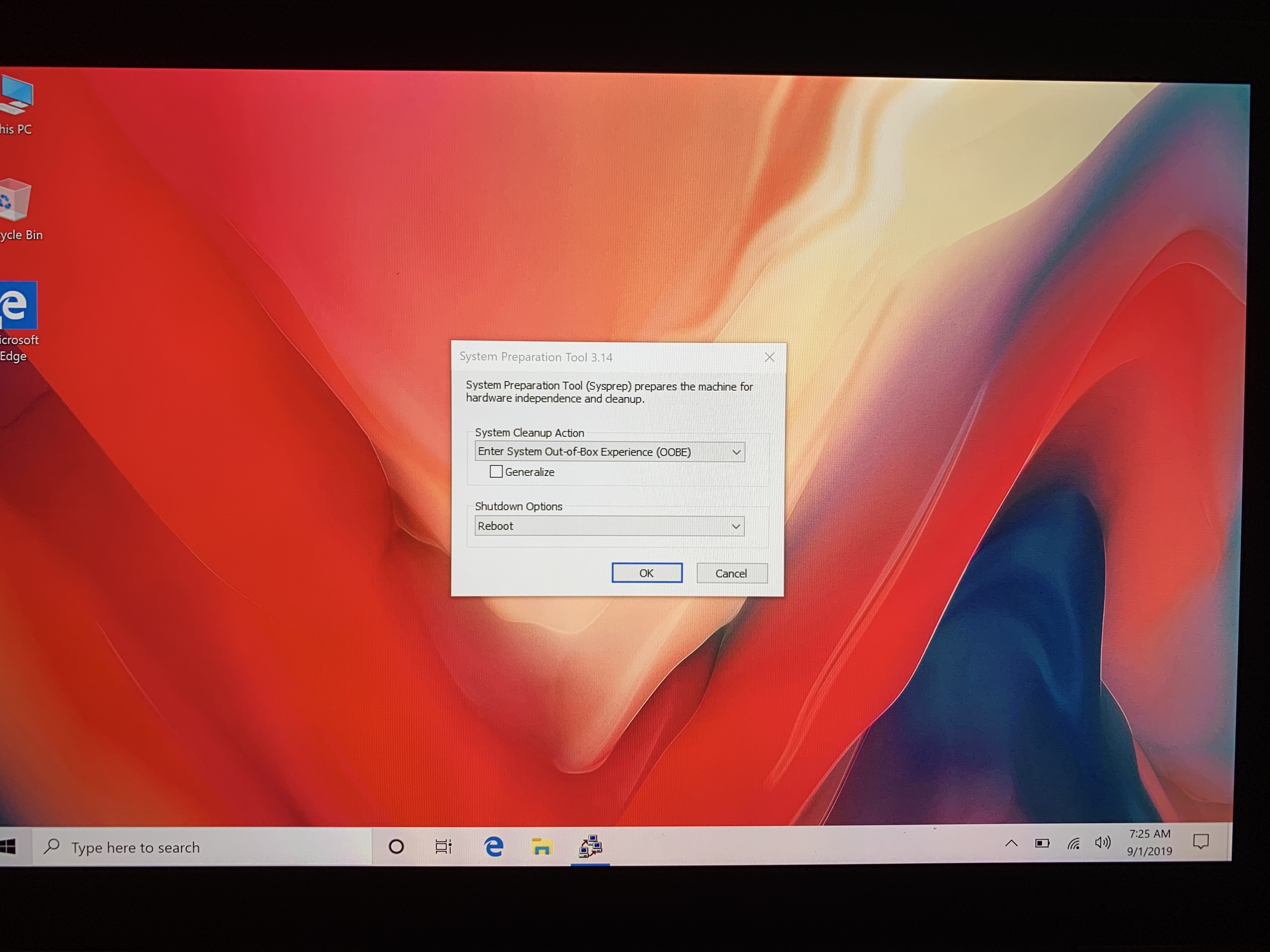
#### Post date: [September 1, 2019, 2:25pm UTC](https://gpdsupport.com/t/account-locked-when-boot-into-windows/178/6 "2019-09-01T14:25:59Z")
Nope. It shuts down. But when it reboots, it goes into account locked again. I have tried to use the restart option, it boots into windows with the
![image|375x500]
---
### Author:  [@petem](https://gpdsupport.com/u/petem)
#### Post date: [September 1, 2019, 2:32pm UTC](https://gpdsupport.com/t/account-locked-when-boot-into-windows/178/7 "2019-09-01T14:32:42Z")
Try this
Open Command Prompt
type the following
```auto
Sysprep /generalize /shutdown /oobe
```
---
### Author:  [@Ion23](https://gpdsupport.com/u/Ion23)
#### Post date: [September 2, 2019, 1:43am UTC](https://gpdsupport.com/t/account-locked-when-boot-into-windows/178/8 "2019-09-02T01:43:19Z")
Ok. That didn’t work. But what I did was to choose “shutdown” from the drop down menu I saw. Seems to work.
---
### Author:  [@petem](https://gpdsupport.com/u/petem)
#### Post date: [September 2, 2019, 7:47am UTC](https://gpdsupport.com/t/account-locked-when-boot-into-windows/178/9 "2019-09-02T07:47:44Z")
Great glad this got sorted. I’ll mark it as resolved. Thanks for your help.
---
### Author:  [@Ion23](https://gpdsupport.com/u/Ion23)
#### Post date: [September 2, 2019, 11:35am UTC](https://gpdsupport.com/t/account-locked-when-boot-into-windows/178/10 "2019-09-02T11:35:29Z")
Could I check with you. What’s the difference between updating the firmware and the other windows 8gb update? I’m familiar with the usual bios update, but the windows update is new to me. Is that the complete new installation of windows?