# High CPU and Disk I/O primarily caused by MsMpEng.exe?
**URL:** https://gpdsupport.com/t/high-cpu-and-disk-i-o-primarily-caused-by-msmpeng-exe/185
**Category:** Support & Help Requests
**Tags:** windows, p2max
**Created:** [September 1, 2019, 2:38pm UTC](https://gpdsupport.com/t/high-cpu-and-disk-i-o-primarily-caused-by-msmpeng-exe/185 "2019-09-01T14:38:05Z")
**Posts on this page:** 13
**Page:** 1
### Author:  [@petem](https://gpdsupport.com/u/petem)
#### Post date: [September 1, 2019, 2:38pm UTC](https://gpdsupport.com/t/high-cpu-and-disk-i-o-primarily-caused-by-msmpeng-exe/185/1 "2019-09-01T14:38:05Z")
Is anyone having intermittent high cpu temp at idle?
I’m running latest bios 0.21. thanks.
Haven’t had time to look into it properly just putting it here as a placer until i get more time.
I suppose most users would probably not notice because the fan is loud all the time generally so you would be unaware of a cpu spiking high unless using HWMonitor / HWiNFO or Resource Monitor?
Obviously it would be noticeable playing a game as when mine is spiking out i can struggle to close resource monitor so gaming wouldn’t be doing too good.
---
### Author:  [@SomberBanana](https://gpdsupport.com/u/SomberBanana)
#### Post date: [September 1, 2019, 3:20pm UTC](https://gpdsupport.com/t/high-cpu-and-disk-i-o-primarily-caused-by-msmpeng-exe/185/2 "2019-09-01T15:20:15Z")
Only for comparison: bios 0.19 - constant 47-49 degrees at idle while charging.
---
### Author:  [@petem](https://gpdsupport.com/u/petem)
#### Post date: [September 1, 2019, 3:26pm UTC](https://gpdsupport.com/t/high-cpu-and-disk-i-o-primarily-caused-by-msmpeng-exe/185/3 "2019-09-01T15:26:02Z")
using Windows Resource Monitor I can see that the bulk of the cpu sometimes spiking cpu to go above 100% is msmpeng.exe
and tiworker.exe
msmpeng.exe see here [https://thewindowscentral.com/msmpeng-exe-high-cpu/](https://thewindowscentral.com/msmpeng-exe-high-cpu/)
and tiworker.exe see here [https://answers.microsoft.com/en-us/windows/forum/windows\_10-performance/high-cpu-usage-caused-by-tiworkerexe/ae12110a-15ca-49cb-be24-c6200072b436](https://answers.microsoft.com/en-us/windows/forum/windows_10-performance/high-cpu-usage-caused-by-tiworkerexe/ae12110a-15ca-49cb-be24-c6200072b436)
---
### Author:  [@petem](https://gpdsupport.com/u/petem)
#### Post date: [September 1, 2019, 3:40pm UTC](https://gpdsupport.com/t/high-cpu-and-disk-i-o-primarily-caused-by-msmpeng-exe/185/4 "2019-09-01T15:40:29Z")
FYI - Using psensor ([https://itsfoss.com/check-laptop-cpu-temperature-ubuntu/](https://itsfoss.com/check-laptop-cpu-temperature-ubuntu/)) in Ubuntu Mate 19.04 Live to check CPU temp at idle and its 46-47 degrees.
---
### Author:  [@petem](https://gpdsupport.com/u/petem)
#### Post date: [September 2, 2019, 8:36pm UTC](https://gpdsupport.com/t/high-cpu-and-disk-i-o-primarily-caused-by-msmpeng-exe/185/5 "2019-09-02T20:36:06Z")
Ok so further diagnostics after doing ALL windows updates and restarting and checking all was happy indicates that the issue is with MsMpEng.exe
I’m getting excessively high CPU and some Disk I/O issues and sudden increase in Memory Hard Faults/sec
see screenshot.
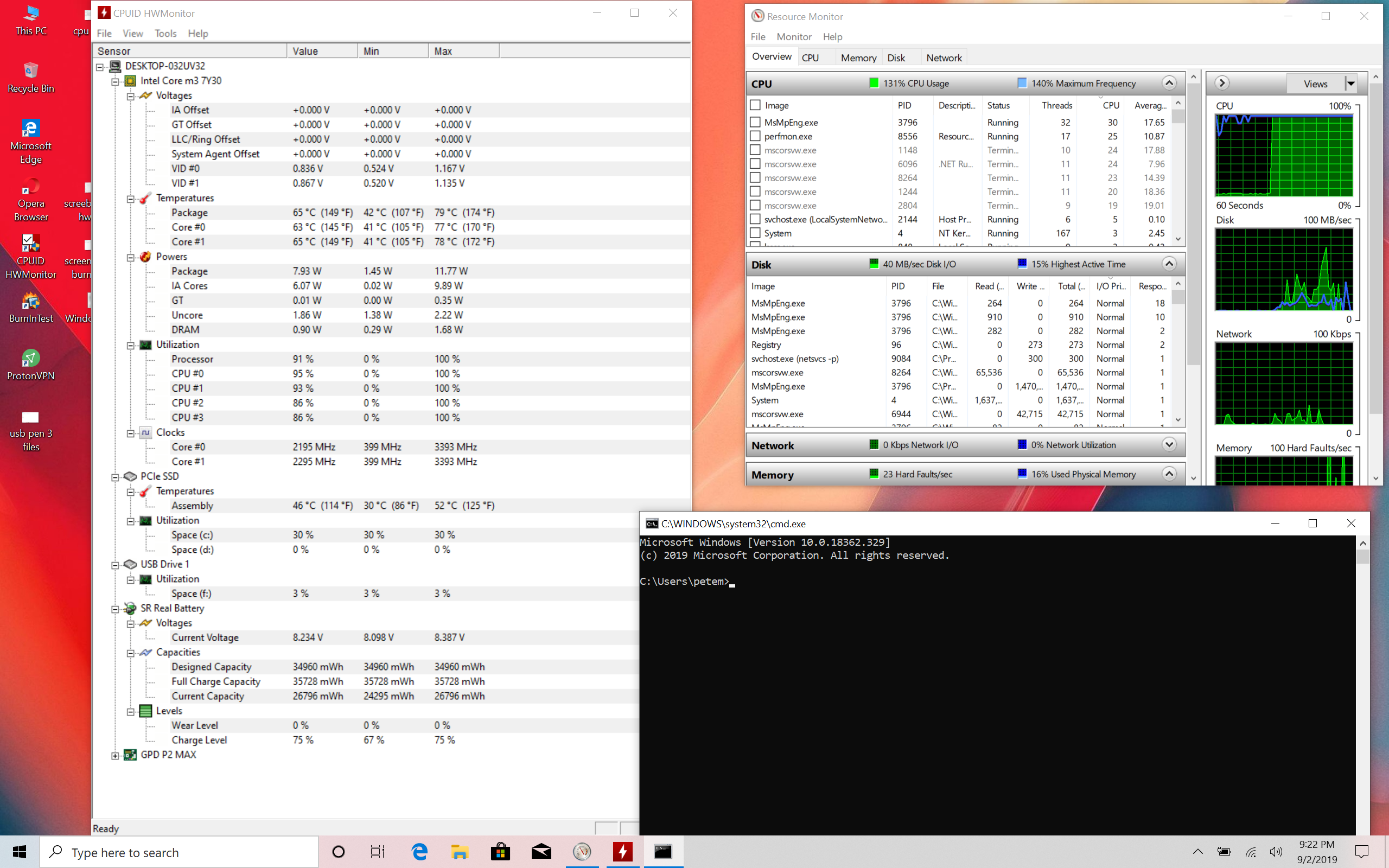
This is happening frequently but in bursts so I will experience spike in CPU and I/O and then will be maxed out for a 2-4 minutes then die off on its own. Then 15 minutes or so the same thing happens again.
I’ll try get a better screenshot as I managed to catch this. I’ve modified the Thread Title to reflect the issue.
Any advice would be appreciated.
Thanks
---
### Author:  [@petem](https://gpdsupport.com/u/petem)
#### Post date: [September 2, 2019, 8:40pm UTC](https://gpdsupport.com/t/high-cpu-and-disk-i-o-primarily-caused-by-msmpeng-exe/185/6 "2019-09-02T20:40:06Z")
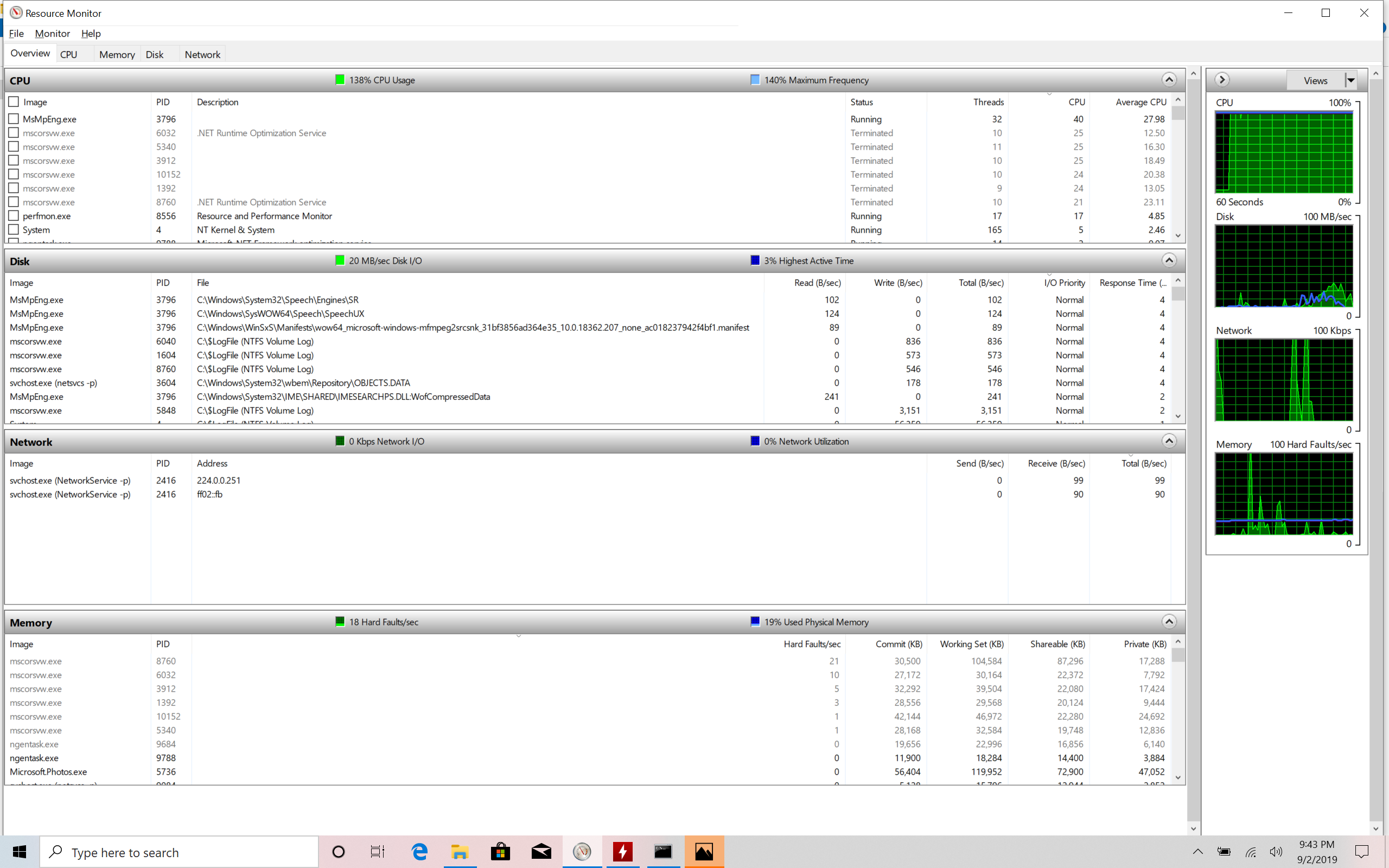
It just happened again and as well as the above I see mscorescw.exe several times appear as status (terminated)
---
### Author:  [@Bluegizmo83](https://gpdsupport.com/u/Bluegizmo83)
#### Post date: [September 2, 2019, 8:46pm UTC](https://gpdsupport.com/t/high-cpu-and-disk-i-o-primarily-caused-by-msmpeng-exe/185/7 "2019-09-02T20:46:09Z")
@petem MsMpEng.exe is part of Windows Defender (built-in antivirus). You could try disabling that and download a different A/V program. Otherwise, it might just be doing updates and running initial scans and might calm down after awhile.
---
### Author:  [@petem](https://gpdsupport.com/u/petem)
#### Post date: [September 2, 2019, 8:49pm UTC](https://gpdsupport.com/t/high-cpu-and-disk-i-o-primarily-caused-by-msmpeng-exe/185/8 "2019-09-02T20:49:59Z")
Hmm. I never enabled it. I Just checked in “Windows Security” app and “Virus & threat protection” has a yellow exclamation mark and a button that says turn on.
I assume therefore that it’s not enabled?
EDIT: Rule 1 - Never assume. lol. I’m always quick to say this to others but seeminly dont take my own advice huh? lol
I can see that inside settings "Real time protection and Cloud Delivered Protection and Automatic sample submission are all ON.
I will disable thanks. @Bluegizmo83
---
### Author:  [@Bluegizmo83](https://gpdsupport.com/u/Bluegizmo83)
#### Post date: [September 2, 2019, 8:54pm UTC](https://gpdsupport.com/t/high-cpu-and-disk-i-o-primarily-caused-by-msmpeng-exe/185/9 "2019-09-02T20:54:42Z")
@petem lol no problem, we’ve all done it 🙂
I did also find this, if it still shows up after disabling Defender:
> If Windows Defender is “off” should MsMpEng even be running?
Only and only if you have Microsoft Security Essentials or System Center Endpoint Protection installed.
Otherwise, no.
---
### Author:  [@petem](https://gpdsupport.com/u/petem)
#### Post date: [September 2, 2019, 9:04pm UTC](https://gpdsupport.com/t/high-cpu-and-disk-i-o-primarily-caused-by-msmpeng-exe/185/10 "2019-09-02T21:04:10Z")
To Disable Windows Security for All Users I used regedit to changed following Registry Keys
(Windows Defender Security Center Service)
HKEY\_LOCAL\_MACHINE\SYSTEM\CurrentControlSet\Services\SecurityHealthService
(Security Center service)
HKEY\_LOCAL\_MACHINE\SYSTEM\CurrentControlSet\Services\wscsvc
**Start** DWORD
**2** = Enable
**4** = Disable
I then restarted the machine.
see here:
> **[Enable or Disable Windows Security in Windows 10](https://www.tenforums.com/tutorials/110230-enable-disable-windows-security-windows-10-a.html)**
>
> How to Enable or Disable Windows Security in Windows 10
Marking as resolved - pending re-test.
---
### Author:  [@petem](https://gpdsupport.com/u/petem)
#### Post date: [September 2, 2019, 9:12pm UTC](https://gpdsupport.com/t/high-cpu-and-disk-i-o-primarily-caused-by-msmpeng-exe/185/11 "2019-09-02T21:12:36Z")
Nope. Still happening.
Any one have any suggestions?
I’ve checked and cannot see Microsoft Security Essentials installed or System Center Endpoint Protection
---
### Author:  [@Bluegizmo83](https://gpdsupport.com/u/Bluegizmo83)
#### Post date: [September 2, 2019, 9:21pm UTC](https://gpdsupport.com/t/high-cpu-and-disk-i-o-primarily-caused-by-msmpeng-exe/185/12 "2019-09-02T21:21:22Z")
@petem might be worth checking the windows system services (Control Panel \> Administrative Tools \> Services) and scroll down to the Windows Defender items and make sure they’re Startup Type is set to Manual or Disabled.
---
### Author:  [@petem](https://gpdsupport.com/u/petem)
#### Post date: [September 3, 2019, 10:25am UTC](https://gpdsupport.com/t/high-cpu-and-disk-i-o-primarily-caused-by-msmpeng-exe/185/13 "2019-09-03T10:25:33Z")
For some reason when I go in here I can see
1. Windows Defender Antivirus Network Inspection Service
2. Windows Defender Antivirus Service
Both will not allow me to stop them and when I double click and get properties Start / Stop / pause and resume are greyed out.
I tried in normal and running Control Panel\>Administrator Tools\>services in Administrator mode
I also tried in msconfig \> services but seems it won’t disable
Any solution ?