# Keyboard and mouse doesnt work when turn on the PCMax
**URL:** https://gpdsupport.com/t/keyboard-and-mouse-doesnt-work-when-turn-on-the-pcmax/277
**Category:** Support & Help Requests
**Tags:** p2max
**Created:** [September 9, 2019, 7:35pm UTC](https://gpdsupport.com/t/keyboard-and-mouse-doesnt-work-when-turn-on-the-pcmax/277 "2019-09-09T19:35:57Z")
**Posts on this page:** 20
**Page:** 1
### Author:  [@nev3rmi](https://gpdsupport.com/u/nev3rmi)
#### Post date: [September 9, 2019, 7:35pm UTC](https://gpdsupport.com/t/keyboard-and-mouse-doesnt-work-when-turn-on-the-pcmax/277/1 "2019-09-09T19:35:58Z")
When I turn on the PC it took awhile to work with keyboard and mouse
> **[20190909\_100723.mp4 (video)](https://drive.google.com/file/d/12gjFmtfw6VemaKiyY2pm9Of7uWQojR67/view?usp=drivesdk)**
>
> Google Drive file.
> **[20190909\_100625.mp4 (video)](https://drive.google.com/file/d/12hp3_GiNh3tVsQA3Ru9nX8tlalko5899/view?usp=drivesdk)**
>
> Google Drive file.
---
### Author:  [@petem](https://gpdsupport.com/u/petem)
#### Post date: [September 9, 2019, 8:58pm UTC](https://gpdsupport.com/t/keyboard-and-mouse-doesnt-work-when-turn-on-the-pcmax/277/2 "2019-09-09T20:58:54Z")
Hi @nev3rmi
We have heard this issue happen before for one other customer.
The fix was as follows:
1. Create a Bootable USB flash drive by using Microsoft Media Creation Tool see here: [https://www.tenforums.com/tutorials/2376-create-bootable-usb-flash-drive-install-windows-10-a.html#option1](https://www.tenforums.com/tutorials/2376-create-bootable-usb-flash-drive-install-windows-10-a.html#option1)
2. Download Windows Drivers for p2 max from GPD site here and put on another different USB drive:
[GPD-All-WIN10\_X64\_drivers\_V2.zip - Google Drive](https://drive.google.com/open?id=1h_sK_HRAYZ14XxDeMxIsW_rosqFsh2I-)
3. Install Windows fresh
I hope this solves your issue as it did for the person below.
NB: Also if your thinking of updating the bios I would avoid BIOS update 0.23 for now as I don’t think its good. I think 0.21 or 0.22 was better and I’m advised today by someone far more technical than me that its currently not possible to downgrade the bios.
Thanks.
> [@Keyboard and Touchpad stopped responding](https://gpdsupport.com/t/keyboard-and-touchpad-stopped-responding/29/5):
>
> @ash この場合、クリーンな新規インストールを実行し、GPDが提供する最新のドライバーを使用することを強くお勧めします。 クリーンインストール後、BIOSを最新バージョンにフラッシュし、これが役立つかどうかを確認します。 最新のBIOSバージョンの手順については、gpdsupport.comをご覧ください。 cmosの損傷を避けるため、指示を注意深くお読みください。 どうもありがとうございました English Translation In this case, it is strongly recommended that you perform a clean new installation and use the latest drivers provided by GPD. After a clean installation, flash the BIOS to the latest version and see if this helps. Visit [GPD P2 Max - [FIRMWARE] BIOS version 0.21 released -…](https://gpdsupport.com/t/gpd-p2-max-firmware-bios-version-0-21-released-modified-fan-strategy-to-reduce-noise/136/2)
---
### Author:  [@nev3rmi](https://gpdsupport.com/u/nev3rmi)
#### Post date: [September 10, 2019, 3:23am UTC](https://gpdsupport.com/t/keyboard-and-mouse-doesnt-work-when-turn-on-the-pcmax/277/3 "2019-09-10T03:23:12Z")
So I am the only one got that problem?
---
### Author:  [@petem](https://gpdsupport.com/u/petem)
#### Post date: [September 10, 2019, 9:21am UTC](https://gpdsupport.com/t/keyboard-and-mouse-doesnt-work-when-turn-on-the-pcmax/277/4 "2019-09-10T09:21:35Z")
I have no idea sorry. We are unofficial user community support not GPD. I am personally aware of one other person who had this issue and it was resolved by a reinstall as I explained and linked the thread.
Hope that helps.
---
### Author:  [@nev3rmi](https://gpdsupport.com/u/nev3rmi)
#### Post date: [September 11, 2019, 4:24pm UTC](https://gpdsupport.com/t/keyboard-and-mouse-doesnt-work-when-turn-on-the-pcmax/277/5 "2019-09-11T16:24:23Z")
I think this is a problem with driver, when I install the windows alone, I didn’t get that problem … However, when I install the driver completely I got that problem…
---
### Author:  [@petem](https://gpdsupport.com/u/petem)
#### Post date: [September 11, 2019, 4:25pm UTC](https://gpdsupport.com/t/keyboard-and-mouse-doesnt-work-when-turn-on-the-pcmax/277/6 "2019-09-11T16:25:40Z")
Use default windows one if that’s possible.
Is it working now you reinstalled windows?
---
### Author:  [@nev3rmi](https://gpdsupport.com/u/nev3rmi)
#### Post date: [September 11, 2019, 4:59pm UTC](https://gpdsupport.com/t/keyboard-and-mouse-doesnt-work-when-turn-on-the-pcmax/277/7 "2019-09-11T16:59:00Z")
I did a few times…
when you turn on the PC after shutdown, do you get the same problem as I did? Or just me alone …
---
### Author:  [@petem](https://gpdsupport.com/u/petem)
#### Post date: [September 11, 2019, 5:53pm UTC](https://gpdsupport.com/t/keyboard-and-mouse-doesnt-work-when-turn-on-the-pcmax/277/8 "2019-09-11T17:53:18Z")
I do not get this problem. As I said earlier I only know of one person who got this problem other than you and that person resolved it by reinstalling windows fresh.
If you do clean install and forget about using gpd provided driver is your keyboard and touchpad responding? If so can we resolve this support request?
Many thanks
---
### Author:  [@nev3rmi](https://gpdsupport.com/u/nev3rmi)
#### Post date: [September 12, 2019, 1:58am UTC](https://gpdsupport.com/t/keyboard-and-mouse-doesnt-work-when-turn-on-the-pcmax/277/9 "2019-09-12T01:58:10Z")
so after a long shutdown the computer your PC doesn’t take a long time to let the keyboard work properly?
---
### Author:  [@petem](https://gpdsupport.com/u/petem)
#### Post date: [September 12, 2019, 9:37am UTC](https://gpdsupport.com/t/keyboard-and-mouse-doesnt-work-when-turn-on-the-pcmax/277/10 "2019-09-12T09:37:12Z")
No sorry.
You are alone.
---
### Author:  [@Yuho](https://gpdsupport.com/u/Yuho)
#### Post date: [September 14, 2019, 2:56am UTC](https://gpdsupport.com/t/keyboard-and-mouse-doesnt-work-when-turn-on-the-pcmax/277/11 "2019-09-14T02:56:51Z")
I have the same issue. The keyboard and touchpad do not respond for a few minutes after the machine start up.
The keyboard does not respond with normal typing, but if I hold down the key for a long time, it will be entered continuously after a few second.
---
### Author:  [@nev3rmi](https://gpdsupport.com/u/nev3rmi)
#### Post date: [September 14, 2019, 5:54am UTC](https://gpdsupport.com/t/keyboard-and-mouse-doesnt-work-when-turn-on-the-pcmax/277/12 "2019-09-14T05:54:46Z")
This is the hardware problem
---
### Author:  [@Yuho](https://gpdsupport.com/u/Yuho)
#### Post date: [September 14, 2019, 11:38am UTC](https://gpdsupport.com/t/keyboard-and-mouse-doesnt-work-when-turn-on-the-pcmax/277/13 "2019-09-14T11:38:23Z")
I agree, because it’s always happened the keyboard issue and the touchpad issue at the same time.
And this problem also occurs in the BIOS menu.
This problem is not cause of driver nor windows, I think.
---
### Author:  [@nev3rmi](https://gpdsupport.com/u/nev3rmi)
#### Post date: [September 14, 2019, 1:03pm UTC](https://gpdsupport.com/t/keyboard-and-mouse-doesnt-work-when-turn-on-the-pcmax/277/14 "2019-09-14T13:03:19Z")
Please help me to support my post in indiegogo
---
### Author:  [@nev3rmi](https://gpdsupport.com/u/nev3rmi)
#### Post date: [September 14, 2019, 1:03pm UTC](https://gpdsupport.com/t/keyboard-and-mouse-doesnt-work-when-turn-on-the-pcmax/277/15 "2019-09-14T13:03:59Z")
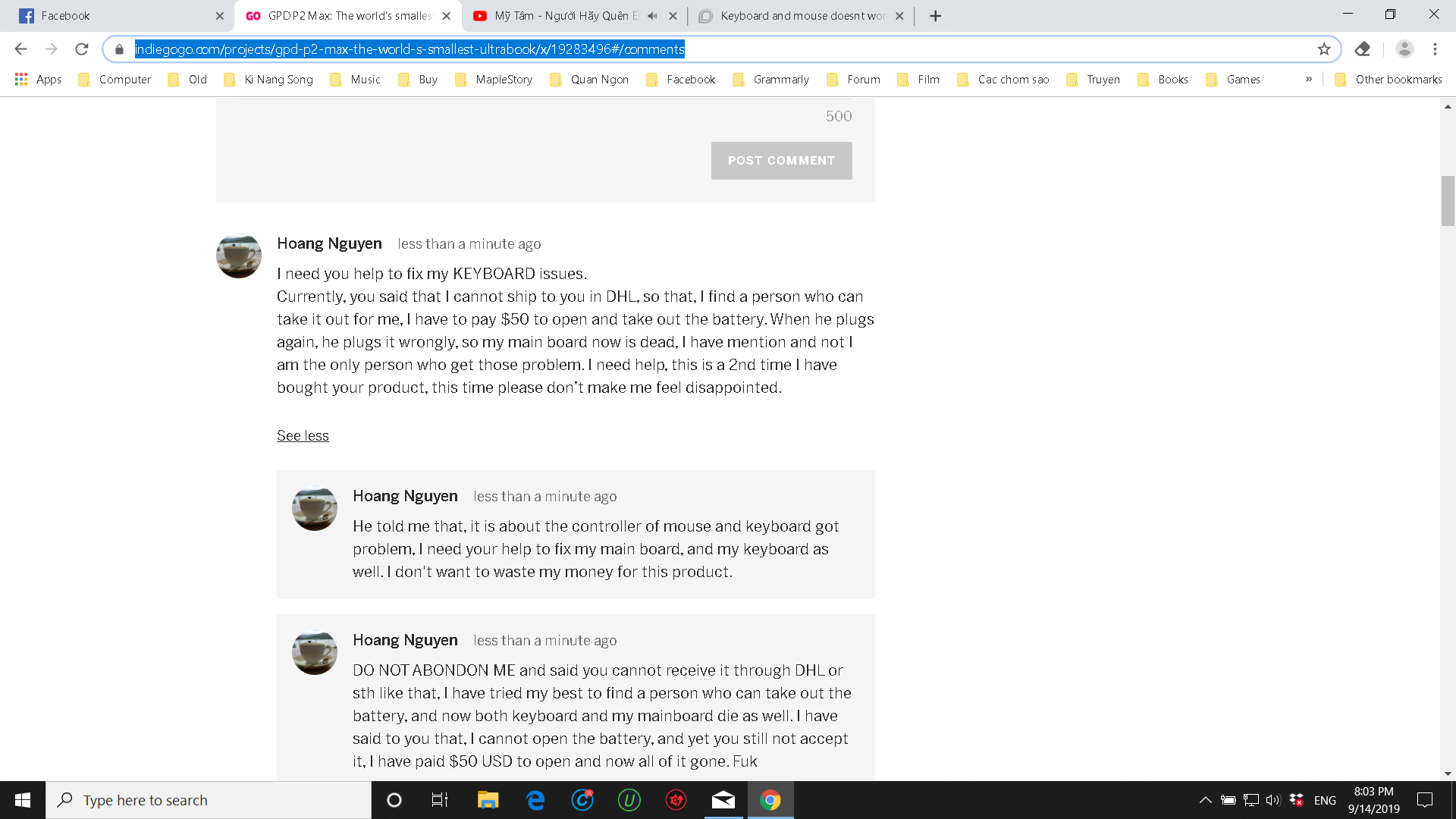
---
### Author:  [@Yuho](https://gpdsupport.com/u/Yuho)
#### Post date: [September 15, 2019, 3:01am UTC](https://gpdsupport.com/t/keyboard-and-mouse-doesnt-work-when-turn-on-the-pcmax/277/16 "2019-09-15T03:01:11Z")
I tried to recover machine with **GPD P2 Max Windows Firmware 20190703** they suggested, but it did not worked.
I recorded a video of this issue. I will upload it and comment in indiegogo site.
Anyway, this week is Chinese holiday, so they might be not response us. Let’s wait ther response. You are not alone.
---
### Author:  [@nev3rmi](https://gpdsupport.com/u/nev3rmi)
#### Post date: [September 15, 2019, 4:41am UTC](https://gpdsupport.com/t/keyboard-and-mouse-doesnt-work-when-turn-on-the-pcmax/277/17 "2019-09-15T04:41:24Z")
Tks you 🙂 we will make it
---
### Author:  [@aravind](https://gpdsupport.com/u/aravind)
#### Post date: [September 15, 2019, 7:40am UTC](https://gpdsupport.com/t/keyboard-and-mouse-doesnt-work-when-turn-on-the-pcmax/277/18 "2019-09-15T07:40:10Z")
Its seems to be holidays till the 15th. So probably they might reply by tomorrow to your comments on IGG.
Let’s wait and see, and I hope your problem gets resolved.
---
### Author:  [@nev3rmi](https://gpdsupport.com/u/nev3rmi)
#### Post date: [September 15, 2019, 8:01am UTC](https://gpdsupport.com/t/keyboard-and-mouse-doesnt-work-when-turn-on-the-pcmax/277/19 "2019-09-15T08:01:54Z")
Let hope they will 😕
---
### Author:  [@Yuho](https://gpdsupport.com/u/Yuho)
#### Post date: [September 16, 2019, 1:56am UTC](https://gpdsupport.com/t/keyboard-and-mouse-doesnt-work-when-turn-on-the-pcmax/277/20 "2019-09-16T01:56:56Z")
I uploaded my two videos on youtube.
[Next page](https://gpdsupport.com/t/keyboard-and-mouse-doesnt-work-when-turn-on-the-pcmax/277.md?page=2)