# Touchpad Scroll Speed problem
**URL:** https://gpdsupport.com/t/touchpad-scroll-speed-problem/164
**Category:** Outstanding Issue
**Tags:** linux, p2max
**Created:** [August 30, 2019, 6:16pm UTC](https://gpdsupport.com/t/touchpad-scroll-speed-problem/164 "2019-08-30T18:16:06Z")
**Posts on this page:** 20
**Page:** 1
### Author:  [@petem](https://gpdsupport.com/u/petem)
#### Post date: [August 30, 2019, 6:16pm UTC](https://gpdsupport.com/t/touchpad-scroll-speed-problem/164/1 "2019-08-30T18:16:06Z")
This is a placer for any details which may come back from the Other Linux thread about scroll speed of touchpad. @joshwiththegoodhair and @jasper have been looking into this issue.
More to follow in due course.
Thanks
---
### Author:  [@joshwiththegoodhair](https://gpdsupport.com/u/joshwiththegoodhair)
#### Post date: [August 30, 2019, 6:40pm UTC](https://gpdsupport.com/t/touchpad-scroll-speed-problem/164/2 "2019-08-30T18:40:56Z")
I’ve done a bit of tinkering. By default, Xorg seems to use the `libinput` driver by default. `libinput` doesn’t seem as if there are any scroll speed options available. However, if we switch to the `evdev` driver, there are some options available, and I can already see improvement.
I’ll continue tweaking these settings and updating this post.
Step 1: Install the evdev driver from package management (ubuntu: `xserver-xorg-input-evdev`)
Step 2: Create `/etc/X11/xorg.conf.d/20-trackpad.conf` with the contents below
Step 3: Reboot or restart Xorg
```
Section "InputClass"
Identifier "HAILUCK CO.,LTD USB KEYBOARD Mouse"
MatchIsPointer "1"
MatchDevicePath "/dev/input/event*"
Driver "evdev"
# controls scroll speed
Option "VertScrollDelta" "1"
Option "HorizScrollDelta" "1"
Option "DialDelta" "1"
# controls pointer speed
Option "ConstantDeceleration" "2.15"
Option "AccelerationProfile" "2"
Option "AdaptiveDeceleration" "1"
EndSection
```
---
### Author:  [@petem](https://gpdsupport.com/u/petem)
#### Post date: [August 30, 2019, 6:42pm UTC](https://gpdsupport.com/t/touchpad-scroll-speed-problem/164/3 "2019-08-30T18:42:14Z")
Thanks so much @joshwiththegoodhair
This is awesome.
---
### Author:  [@jasper](https://gpdsupport.com/u/jasper)
#### Post date: [August 30, 2019, 7:10pm UTC](https://gpdsupport.com/t/touchpad-scroll-speed-problem/164/4 "2019-08-30T19:10:31Z")
It seems like the best solution so far. Great work! Thank you!
---
### Author:  [@PeterCxy](https://gpdsupport.com/u/PeterCxy)
#### Post date: [August 31, 2019, 1:25pm UTC](https://gpdsupport.com/t/touchpad-scroll-speed-problem/164/5 "2019-08-31T13:25:36Z")
I actually ended up using the same solution I used back with the trackpoint on GPDP 1 – using right click + mouse movement to emulate scrolling. This works much better than any sort of scrolling speed adjustment for me. I would just need to press down at the right side of the touchpad, then move another finger over the touchpad.
I still can’t understand why on earth would they make a touchpad and then report it to system as a mouse, not a touch device. If it was a touchpad to the system, things can be much much better. We have much better driver support and gesture detection by software than what they can do on hardware.
---
### Author:  [@petem](https://gpdsupport.com/u/petem)
#### Post date: [August 31, 2019, 2:00pm UTC](https://gpdsupport.com/t/touchpad-scroll-speed-problem/164/6 "2019-08-31T14:00:00Z")
Thanks for joining us here @PeterCxy and thank you so much for your efforts in providing the solution to fix touchscreen on Linux and providing the method to flash bios without needing Windows. This is excellent. I was originally thinking I’d need to keep windows just to do the bios and firmware upgrades coming from GPD. This saved me from needing Windows. Although I think I may wipe ssd and have small partition with Windows’s on dual boot just in case. Thanks again.
---
### Author:  [@joshwiththegoodhair](https://gpdsupport.com/u/joshwiththegoodhair)
#### Post date: [September 1, 2019, 1:47am UTC](https://gpdsupport.com/t/touchpad-scroll-speed-problem/164/7 "2019-09-01T01:47:36Z")
@PeterCxy - I’ve used the right click to scroll on my other GPD devices, but didn’t even think about it with a touchpad. It works surprisingly well (better than two-finger scroll for sure); thanks for the suggestion!
For anyone else wanting to try this (using the `evdev` driver), I added the following options to the above mentioned Xorg config. Both the two-finger scrolling adjustments and the right click to scroll can coexist as well.
```
Option "EmulateWheel" "True"
Option "EmulateWheelButton" "3"
Option "EmulateWheelInertia" "8"
```
---
### Author:  [@PeterCxy](https://gpdsupport.com/u/PeterCxy)
#### Post date: [September 1, 2019, 4:46am UTC](https://gpdsupport.com/t/touchpad-scroll-speed-problem/164/8 "2019-09-01T04:46:33Z")
BTW the right-click-to-scroll emulation can also be used on GNOME Wayland with libinput by a hack: [https://github.com/PeterCxy/scroll-emulation](https://github.com/PeterCxy/scroll-emulation)
Though I’m not using GNOME for now but in case anyone needs it
---
### Author:  [@joshwiththegoodhair](https://gpdsupport.com/u/joshwiththegoodhair)
#### Post date: [October 3, 2019, 10:30pm UTC](https://gpdsupport.com/t/touchpad-scroll-speed-problem/164/9 "2019-10-03T22:30:48Z")
I found this solution, and it seems to be the best one so far:
> **[GitHub - tkkcc/libinput\_patch: libinput scroll patch, discrete deltaY multiplier](https://github.com/tkkcc/libinput_patch)**
>
> libinput scroll patch, discrete deltaY multiplier. Contribute to tkkcc/libinput\_patch development by creating an account on GitHub.
---
### Author:  [@petem](https://gpdsupport.com/u/petem)
#### Post date: [October 3, 2019, 10:35pm UTC](https://gpdsupport.com/t/touchpad-scroll-speed-problem/164/10 "2019-10-03T22:35:42Z")
Hi @joshwiththegoodhair is this in addition to the PTP upgrade?
---
### Author:  [@joshwiththegoodhair](https://gpdsupport.com/u/joshwiththegoodhair)
#### Post date: [October 3, 2019, 10:37pm UTC](https://gpdsupport.com/t/touchpad-scroll-speed-problem/164/11 "2019-10-03T22:37:45Z")
What’s the PTP upgrade?
---
### Author:  [@petem](https://gpdsupport.com/u/petem)
#### Post date: [October 3, 2019, 10:41pm UTC](https://gpdsupport.com/t/touchpad-scroll-speed-problem/164/12 "2019-10-03T22:41:49Z")
GPD released [new Prescision Touchpad firmware.](http://www.gpd.hk/filedownload/29438) It needs to be installed using windows (unless there is another way to apply it) but I have confirmed that the device is now recognised in Linux after a reboot as a touchpad rather than a HiD compliant mouse and tbh it seems much better.
---
### Author:  [@joshwiththegoodhair](https://gpdsupport.com/u/joshwiththegoodhair)
#### Post date: [October 3, 2019, 10:43pm UTC](https://gpdsupport.com/t/touchpad-scroll-speed-problem/164/13 "2019-10-03T22:43:18Z")
Thanks! I saw that and assumed it was _just_ some sort of precision/certified driver for Windows. I’ll install in a few!
---
### Author:  [@petem](https://gpdsupport.com/u/petem)
#### Post date: [October 3, 2019, 10:45pm UTC](https://gpdsupport.com/t/touchpad-scroll-speed-problem/164/14 "2019-10-03T22:45:16Z")
Would appreciate your feedback if you could tell us if you also notice an improvement and whether you think libinput\_patch is still better as your a more advanced linux user than me. Thanks in advance.
---
### Author:  [@joshwiththegoodhair](https://gpdsupport.com/u/joshwiththegoodhair)
#### Post date: [October 3, 2019, 11:50pm UTC](https://gpdsupport.com/t/touchpad-scroll-speed-problem/164/15 "2019-10-03T23:50:55Z")
😮 WOW - that was a treat! The firmware update essentially made the touchpad fully compatible with the xorg Synaptics driver. This is the gold standard for touchpads, and there is soooo much that is configurable now! You definitely don’t need my above fix.
```
Device 'HAILUCK CO.,LTD USB KEYBOARD Touchpad':
Device Enabled (167): 1
Coordinate Transformation Matrix (169): 1.000000, 0.000000, 0.000000, 0.000000, 1.000000, 0.000000, 0.000000, 0.000000, 1.000000
Device Accel Profile (295): 1
Device Accel Constant Deceleration (296): 2.500000
Device Accel Adaptive Deceleration (297): 1.000000
Device Accel Velocity Scaling (298): 12.500000
Synaptics Edges (299): 40, 984, 40, 710
Synaptics Finger (300): 25, 30, 0
Synaptics Tap Time (301): 180
Synaptics Tap Move (302): 55
Synaptics Tap Durations (303): 180, 180, 100
Synaptics ClickPad (304): 1
Synaptics Middle Button Timeout (305): 0
Synaptics Two-Finger Pressure (306): 282
Synaptics Two-Finger Width (307): 7
Synaptics Scrolling Distance (308): 25, 25
Synaptics Edge Scrolling (309): 0, 0, 0
Synaptics Two-Finger Scrolling (310): 1, 0
Synaptics Move Speed (311): 1.000000, 1.750000, 0.157604, 0.000000
Synaptics Off (312): 0
Synaptics Locked Drags (313): 0
Synaptics Locked Drags Timeout (314): 5000
Synaptics Tap Action (315): 0, 0, 0, 0, 0, 0, 0
Synaptics Click Action (316): 1, 3, 2
Synaptics Circular Scrolling (317): 0
Synaptics Circular Scrolling Distance (318): 0.100000
Synaptics Circular Scrolling Trigger (319): 0
Synaptics Circular Pad (320): 0
Synaptics Palm Detection (321): 0
Synaptics Palm Dimensions (322): 10, 200
Synaptics Coasting Speed (323): 20.000000, 50.000000
Synaptics Pressure Motion (324): 30, 160
Synaptics Pressure Motion Factor (325): 1.000000, 1.000000
Synaptics Grab Event Device (326): 0
Synaptics Gestures (327): 1
Synaptics Capabilities (328): 1, 0, 0, 1, 1, 0, 0
Synaptics Pad Resolution (329): 17, 15
Synaptics Area (330): 0, 0, 0, 0
Synaptics Soft Button Areas (331): 512, 0, 615, 0, 0, 0, 0, 0
Synaptics Noise Cancellation (332): 6, 6
Device Product ID (291): 9610, 32
Device Node (290): "/dev/input/event10"
```
---
### Author:  [@petem](https://gpdsupport.com/u/petem)
#### Post date: [October 3, 2019, 11:51pm UTC](https://gpdsupport.com/t/touchpad-scroll-speed-problem/164/16 "2019-10-03T23:51:57Z")
Glad you like 😃
---
### Author:  [@joshwiththegoodhair](https://gpdsupport.com/u/joshwiththegoodhair)
#### Post date: [October 4, 2019, 12:04am UTC](https://gpdsupport.com/t/touchpad-scroll-speed-problem/164/17 "2019-10-04T00:04:14Z")
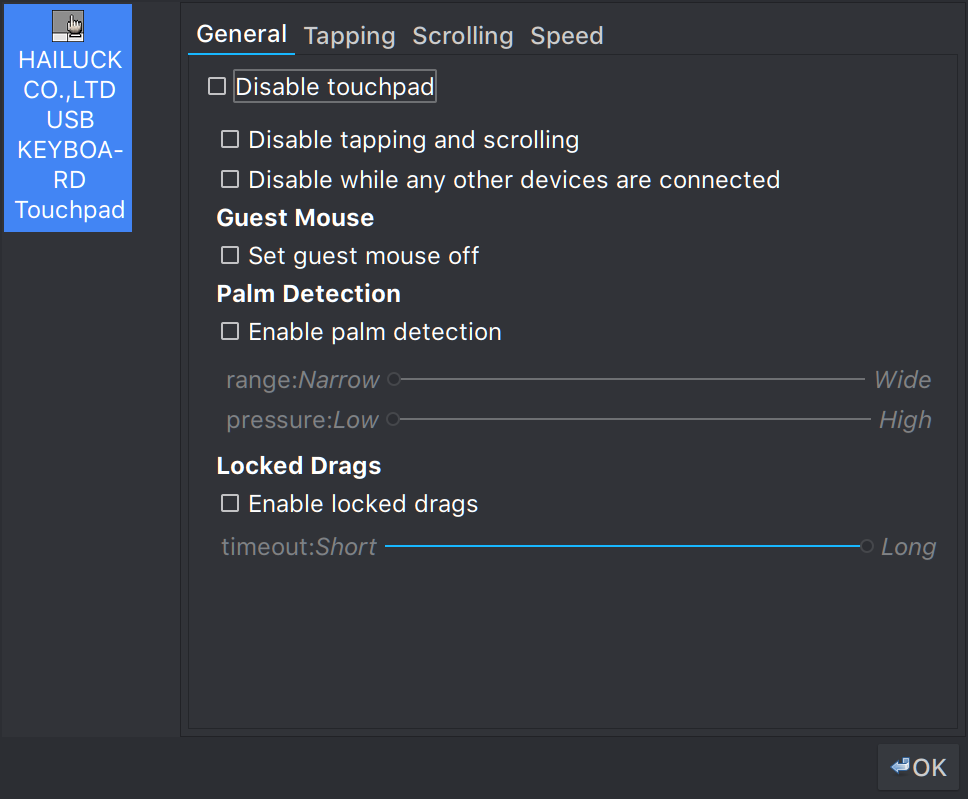
I recommend the utility `gpointing-device-settings` to configure options from a GUI and `synclient` for command-line.
---
### Author:  [@petem](https://gpdsupport.com/u/petem)
#### Post date: [October 4, 2019, 12:05am UTC](https://gpdsupport.com/t/touchpad-scroll-speed-problem/164/18 "2019-10-04T00:05:46Z")
Pretty sure this is standard in Ubuntu Mate 19.10
Mine looks very similar to that screenshot by default.
---
### Author:  [@joshwiththegoodhair](https://gpdsupport.com/u/joshwiththegoodhair)
#### Post date: [October 4, 2019, 12:21am UTC](https://gpdsupport.com/t/touchpad-scroll-speed-problem/164/19 "2019-10-04T00:21:07Z")
This is also a script I wrote a LONG time ago to tweak the settings on my 13" Dell XPS, but it describes the options (from man) as well as my notes (at the time): [https://gist.github.com/joshskidmore/ef6d3c92f8b6ff3d89fefa2326b9b68a](https://gist.github.com/joshskidmore/ef6d3c92f8b6ff3d89fefa2326b9b68a)
I know I spent a lot of time working to get palm rejection just right, so hopefully that will carry over with the P2Max!
PS: All these settings can be set more permanently using Xorg config, but I preferred this script because I could easily tweak and re-run it.
---
### Author:  [@js33811](https://gpdsupport.com/u/js33811)
#### Post date: [October 4, 2019, 2:07am UTC](https://gpdsupport.com/t/touchpad-scroll-speed-problem/164/20 "2019-10-04T02:07:06Z")
Thanks for the update, now I need to nuke linux and reinstall windows \>\_\<